| |||||||||||||||||||||||||||||||||||||||
Friday, March 8, 2013


Monday, January 14, 2013
ASCD Express 8.07 - Strength-Based Learning Strategies for Special Needs Students
ASCD Express 8.07 - Strength-Based Learning Strategies for Special Needs Students
As I read this summary of the article above, I am reminded of the best teaching practices I studied in my pre-service teaching as well as the professional development opportunities in my teaching career. After 9 years in the classroom I cannot stress enough how essential it is to reach these students in the ways that help them learn the most. It does take more time, effort, and planning on the side of the teacher, but aren't the rewards worth it? The methods described also help motivate other students who have not been identified for special needs services, so it is more of the issue of universal design that teachers should consider when using these strategies in their classrooms.
As I read this summary of the article above, I am reminded of the best teaching practices I studied in my pre-service teaching as well as the professional development opportunities in my teaching career. After 9 years in the classroom I cannot stress enough how essential it is to reach these students in the ways that help them learn the most. It does take more time, effort, and planning on the side of the teacher, but aren't the rewards worth it? The methods described also help motivate other students who have not been identified for special needs services, so it is more of the issue of universal design that teachers should consider when using these strategies in their classrooms.
Sunday, December 25, 2011
Actual Technology Use in the Classroom
This year I have the pleasure of teaching 26 4th graders. We have utilized many types of technology in our learning.
- We have several digital cameras, flip cams, and our iPad 2 that capture our experiences that we upload to our private Facebook page and Youtube Channel.
- Our iPad 2 also has many apps that we use on a daily basis--CNN, BrainPop, dictionary, weather channel, iBooks, AirMicroscope, among others.
- Students also type their work on our classroom wiki that makes it easy to share and continue work on writing when students are not at school.
- Our class website keeps everyone in the loop about learning topics and upcoming events and resources that aid in extending learning beyond the classroom.
- We have also used Capzles timeline maker to share our reading lives and will use Blabberize to share what we've learned about Utah state animals.
- This term we explored audiobooks on our class set of iPods that allow students to engage with reading in a different way.
Tuesday, October 18, 2011
Not nosy, curious
What? How? Where? When? Why? These are the questions that resonate in my classroom, from both my students and me. Exploration is encouraged and viewed with positivity so being nosy is actually a good trait! Every day we observe, listen, watch, and think about what we are processing, which leads to asking questions. This shows that we care and are actually listening to one another. I expect my students to be just as nosy as I am about what they experience in our class subjects and with each other.
When I question students or make mental notes as I observe them, they know that it is so our class can be stronger. If I know them better and understand where they are coming from, I can be a better teacher and guide on their path of academic and social growth. Without asking questions and making sense of what I'm seeing and hearing, I am at a disadvantage of understanding my students and their families. Cheers to those educators who proudly state they are nosy! I say, the nosier the better!
When I question students or make mental notes as I observe them, they know that it is so our class can be stronger. If I know them better and understand where they are coming from, I can be a better teacher and guide on their path of academic and social growth. Without asking questions and making sense of what I'm seeing and hearing, I am at a disadvantage of understanding my students and their families. Cheers to those educators who proudly state they are nosy! I say, the nosier the better!
Tuesday, July 26, 2011
The Ultimate Booklover's Survey
When most adults find out I'm a teacher they usually share their most memorable teacher or school memory. When I also add that I'm a librarian the reaction is different. Either they love or hate reading and they feel compelled to tell me. Children, on the other hand, are quite different. The most common reaction I get from children when they find out I'm a teacher-librarian is an inquisitive one: what is your favorite book? I think they are just trying to stump me, which they do, but over the years I have developed my list of faves to share when asked.
On a librarian list-serv I came across an interesting post by Teresa Schauer. She had gotten this book survey from one of her students and I found it just fascinating. I am a book lover, no doubt, but this questionnaire made me reach far beyond my comfort-zone (ahem, number 29) when discussing books.
I will put my answers up as soon as I have sufficiently thought about them...
If you want to read Teresa's answers they are on her blog.
On a librarian list-serv I came across an interesting post by Teresa Schauer. She had gotten this book survey from one of her students and I found it just fascinating. I am a book lover, no doubt, but this questionnaire made me reach far beyond my comfort-zone (ahem, number 29) when discussing books.
Here are the questions:
1-Your favorite Book:
2-Least Favorite Book:
3-A Book that completely surprised you: (bad/good)
4. - A Book that made you laugh out loud:
5- A Non-fiction book that you actually enjoyed:
7- A Book that’s hard to read:
8- A Book you want to read, but never have:
9- A Book you’ve read more than once:
10- The first novel you remember reading:
11- The Book that made you fall in love with reading:
12- A book so emotionally draining you couldn’t complete it or had to set aside for a bit:
13- Favorite childhood Book:
14- Book that should be on hs/college required reading list:
15- Favorite book dealing with foreign culture:
16- Favorite book turned movie:
17- Book turned movie and completely desecrated:
18- A Book You can’t find on shelves anymore that you love:
19- A Book that changed your mind about a particular subject:
20-A Book you would recommend to an ignorant/racist/closed minded person:
21-A guilty pleasure book:
22-Favorite Series:
23- Favorite Romance Novel:
24 - A Book you later found out the Author lied about:
25-Favorite Autobiographical/Biographical Book:
26-A Book you wish would be written:
27- A Book you would write if you had all the resources:
28- A Book you wish you never read:
29- An Author that you completely avoid/hate won’t read:
30 - An Author that you will read whatever they put out:
If you want to read Teresa's answers they are on her blog.
Tuesday, June 7, 2011
Google Search Stories: Digital Storytelling
After seeing the Super Bowl ad last year, I've been wanting to explore using Google Search Stories in the classroom. Before integrating it into the curriculum I decided to make one to see if it is as user-friendly as Google claims it is. The verdict? It is! I took our recent moving adventures as the "story" in my sample:
I think that students will enjoy using this new tool in many class topics. The one that jumps out the most is that of writing: organization, voice, content and reading: making inferences, cause and effect, summarizing, main idea and details. Students can make these for characters in books in they're reading, describing events in history, exploring science topics--the list goes on and on. Hopefully I will link my new class webpage to this blog so that actual student examples can be viewed as well.
I think that students will enjoy using this new tool in many class topics. The one that jumps out the most is that of writing: organization, voice, content and reading: making inferences, cause and effect, summarizing, main idea and details. Students can make these for characters in books in they're reading, describing events in history, exploring science topics--the list goes on and on. Hopefully I will link my new class webpage to this blog so that actual student examples can be viewed as well.
Tuesday, March 8, 2011
Saturday, February 12, 2011
Monday, January 31, 2011
Sunday, January 30, 2011
Digital Media Literacy 2011
Working with elementary-aged students, I find it imperative that school librarians and teachers communicate and demonstrate how to be digitally literate on the Internet. This Prezi below (made by Sandra Carswell) is a great step in opening up the conversation about what it means and how it can impact their lives. Just as we teach procedures for learning and working together in schools, students must also be taught how to act and understand on the World Wide Web.
Monday, January 3, 2011
Using Prezi in the Classroom
Keeping student attention in the classroom is a must for educators. For the last year I have been exploring and sharing my experiences with Prezi with fellow educators and am impressed by the improvements the team at Prezi has made in its ease of use of its product. The Prezi below, made by Paul Hill, succinctly demonstrates why the tool should be used more in schools.
Saturday, August 14, 2010
A vision of K-12 students
As the new school year begins, I watch this video to be reminded to develop lessons that engage students with constructive use of technology.
Monday, July 26, 2010
Sunday, July 25, 2010
Glogster--finally, posters just got an upgrade!
This summer for an Education of Information Users course, I had to present a lesson that integrates technology and library skills. Immediately, I thought of Glogster--the media-rich, web-based poster that "lives" on the web.
As an educator, I have had a blast working with students in selecting the best presentation tools for their research or inquiry projects. My students want their projects to be memorable, dynamic, creative, and relevant, so when the options of posters, or Power Point presentations comes up, they often say that those are difficult for those with less artistic skills, and they can be tedious to create. So in the fall of 2009 introduced my students to Prezi. They used it to present math survey findings, science investigations, current events, and more.
For an older audience, I think that Glogster will be just as user-friendly and effective as Prezi.
Here is a 90 second preview of how it all works:
Even the news media is picking up on it!
The following tutorial is great for educators:
I personally love to browse the awarded glogs on the EDU page--especially for educators and students.
As an educator, I have had a blast working with students in selecting the best presentation tools for their research or inquiry projects. My students want their projects to be memorable, dynamic, creative, and relevant, so when the options of posters, or Power Point presentations comes up, they often say that those are difficult for those with less artistic skills, and they can be tedious to create. So in the fall of 2009 introduced my students to Prezi. They used it to present math survey findings, science investigations, current events, and more.
For an older audience, I think that Glogster will be just as user-friendly and effective as Prezi.
Here is a 90 second preview of how it all works:
Even the news media is picking up on it!
The following tutorial is great for educators:
I personally love to browse the awarded glogs on the EDU page--especially for educators and students.
Saturday, June 26, 2010
Beginning to get this whole podcasting world...
Here is a link to the RSS Feed for the podcasts I've created in the last 2 days:
http://ella.slis.indiana.edu/~ffarokhi/podcasts/podcasts.xml
http://ella.slis.indiana.edu/~ffarokhi/podcasts/podcasts.xml
Podcasting in libraries

3 full days of podcasting instruction, integration, & hands-on experience. I will report my experiences with the process soon...so far, it's wonderful to create them. Currently we're exploring the use of sound effects, music, and other transitions on the web...
Thursday, June 10, 2010
Looking at blogging with a new perspective
Up until this class I was inexperienced when it came to blogging. I never followed anyone’s blogs, however, I would find links in news articles to people’s blogs and read snippets of their thoughts. Just this year I opened a Wikispaces account and that was my first experience with “naked conversations” that we discussed in class. Through my experiences with wikis I felt like I had more control over what was public and able to be changed by invited members. So initially this blogging assignment definitely pushed me out of my comfort zone. Choosing my words extra carefully came to be a habit during the blogging process, which is not necessarily a bad point, right?
In some ways blogging is more beneficial for a class like ours than, say, an online forum through Oncourse. I enjoyed seeing every classmate’s own, unique take on the selection and design of their blogs. This reflected their interests, style, personalities, that don’t always get to be revealed during a forum discussion. Blogs also allow for embedding media that allows for a richer reading experience. Rather than click on links from a forum post, having instant access to a YouTube video, for example, of a mash-up drives home the message of the blogger more quickly. The ability to add tags to blog posts also helped me to understand every classmate’s take on a topic and I loved seeing their cloud tags on the side of their blogs. It made me want to add them myself to my own posts! Hindsight is 20/20…
In terms of the blogging process for myself, I had a positive experience with using Blogger from Google. The familiar Google layout of prompts and icons helped the set-up go smoothly. I also had fun choosing a design of the blog that I think matches my aesthetic and take on the world of design. Since these blogs are social conversations I wanted the space to be an attractive one! Another feature of Blogger that I liked was the ease of changing the formatting of the text, video, and images to the posts through the HTML view in the editing of new posts screen. In the future I will be adding more widgets to the blog to get some experience with that. I once tried to add a Shelfari widget to the blog, however, it was too big and covered up much of the text of the posts. I’ll have to give it another go and resize the widget. Be on the lookout for more to come to my blog!
On that note, I think it is safe to say that I will continue to blog after this class is over. It may not be focused on just emerging technologies in libraries, but also on education, school libraries, and web 2.0 tools that can be used by students, teachers, and parents. I hope that I will feel more comfortable over time with the concept of sharing my thoughts with the public—especially as I begin my career in the library field. Teaching is one important aspect of the job, however, the tools with which we teach in the library is significant as well. Blogging may help me make sense of the journey I will be going on with my future students and staff members if they are able to comment on the happenings of the blog topics.
As library patrons are becoming increasingly connected, libraries, even school libraries, should be current in their use of reaching their patrons. This course, and the ongoing blogging assignment, has helped me to realize that in the numerous emerging technologies of today, librarians can apply them to their websites. All it takes is careful consideration of the best tools to use and time for moderating the tools. It is not enough to just want to do it and then preparing the website interface for the new tool. The staff must be consistent in promoting the tools, communicating the message to patrons and actually contributing to the tools themselves. If we want patrons to do so, we must expect library staff to be a part of the “conversation” as well. After all, as we discussed on our first night of class, web 2.0 is on its way to web 3.0 soon and librarians don’t want to be left behind in the web 1.0 world.
Tuesday, June 8, 2010
A look at the UES library in 5 minutes or less!
For tonight's library assignment presenations I am choosing an alternative to PowerPoint: Prezi, the Zooming Presentation tool.
Here is a link to the show I created for my short talk about the school library I dug into for this assignent:
http://prezi.com/kvzrrvyb-u44/s603-library-assignment/
I'm looking forward to hearing about everyone's experiences with the libraries they chose to explore & the fun gatherings after class as well...
Here is a link to the show I created for my short talk about the school library I dug into for this assignent:
http://prezi.com/kvzrrvyb-u44/s603-library-assignment/
I'm looking forward to hearing about everyone's experiences with the libraries they chose to explore & the fun gatherings after class as well...
Thursday, June 3, 2010
Online Tutorial on NoodleBib
The topic of online training is becoming increasingly important as the variety of services offered by the library continues to grow. In a school library setting, the librarian is not always available, gasp! Therefore, it would benefit the students, teachers, and parents to have access to online tutorials when approaching certain topics. For example, how to create an online bibliography to add to research projects, papers, etc. The website, NoodleTools, provides free accounts to students and since I have used this tool with my own upper elementary students, I will focus on it for the purpose of this assignment. This topic would make a good online tutorial because the tool itself is online and as students, parents, and teachers use it during a research project, they may not be in the presence of the school librarian, so having unlimited access to it online would be helpful for everyone.
The best delivery method for the tutorial would be a video screencast of the process. This would be better than a podcast because it would include the visual elements necessary for navigating through the tool. It would also be better than a narrated PowerPoint presentation that can be embedded in the library’s website because the user’s eye would be on the cursor moving on screen, rather than looking for what is being highlighted or circled for them.
The audience in this case is elementary aged students (5-12). Teachers and librarians want students to realize at a young age that they must credit sources when researching and presenting their findings in order to be reliable and ethical users of information. By providing students with a free, online tool that will create MLA or APA style citation lists, it shows them that this is a necessary expectation of the research process. As the audience gets older, they can learn about the other tools offered in Noodle Tools, like note taking, citing within the text, outlining, sharing information with their teachers, etc.
The content of the tutorial would begin with a brief shot of the end product: a bibliography or works cited page.
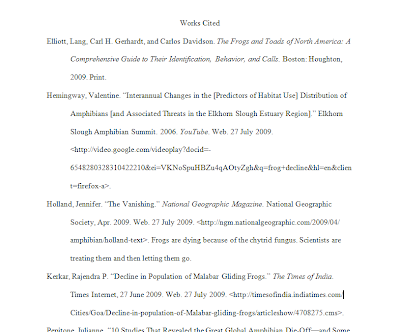
Then there would be a quick distinction between a paper with documentation of sources, and one without so that the purpose of the bibliography is clear to the user.
Then the screen shot would direct the user to the website and shows them how to sign up for a free student account.
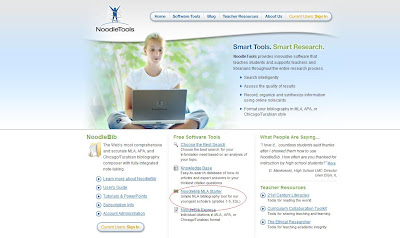
Then they would be directed to select a username and password along with the answer to their security question (the last four digits of their phone number).
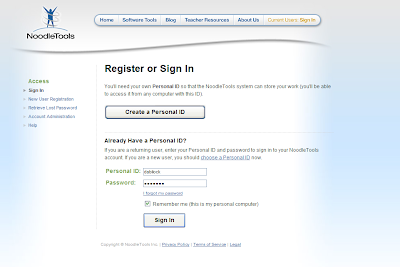
Next, they would see a screenshot of how to create a citation list.
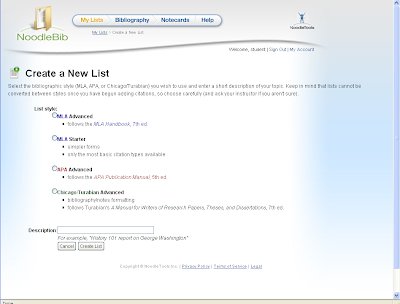
Once they have chosen a style and added a description of their topic, for example, rainforest animals, they will be prompted to add a cite:

Then they will answer questions about their source:
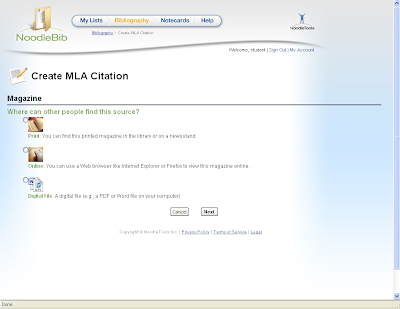
Then they can find the right form for their source and begin filling out the boxes with whatever information they have gathered, noting that some fields are required*:
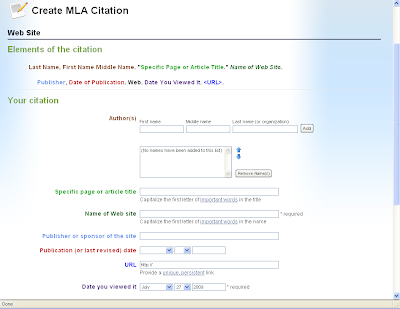
When they have filled out the citation form, they can check their work for errors by clicking on the button at the bottom of the page:
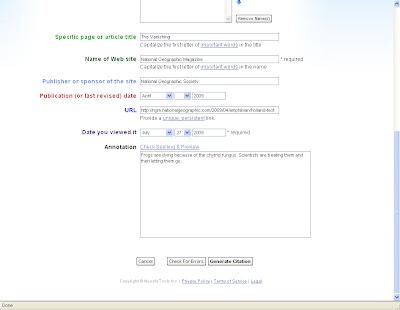
They can make the changes suggested and then generate a citation.
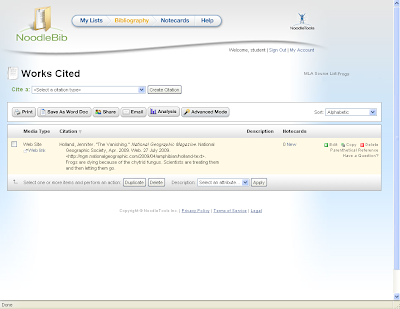
Then show how to choose a format before exporting:
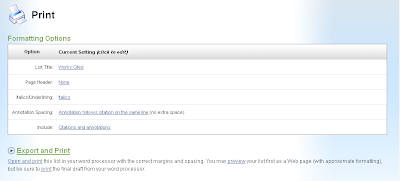
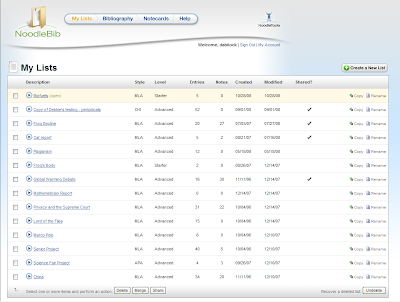
Finally, the tutorial would show how to save and keep all of the citation lists generated for future projects:
The best delivery method for the tutorial would be a video screencast of the process. This would be better than a podcast because it would include the visual elements necessary for navigating through the tool. It would also be better than a narrated PowerPoint presentation that can be embedded in the library’s website because the user’s eye would be on the cursor moving on screen, rather than looking for what is being highlighted or circled for them.
The audience in this case is elementary aged students (5-12). Teachers and librarians want students to realize at a young age that they must credit sources when researching and presenting their findings in order to be reliable and ethical users of information. By providing students with a free, online tool that will create MLA or APA style citation lists, it shows them that this is a necessary expectation of the research process. As the audience gets older, they can learn about the other tools offered in Noodle Tools, like note taking, citing within the text, outlining, sharing information with their teachers, etc.
The content of the tutorial would begin with a brief shot of the end product: a bibliography or works cited page.

Then there would be a quick distinction between a paper with documentation of sources, and one without so that the purpose of the bibliography is clear to the user.
Then the screen shot would direct the user to the website and shows them how to sign up for a free student account.

Then they would be directed to select a username and password along with the answer to their security question (the last four digits of their phone number).

Next, they would see a screenshot of how to create a citation list.

Once they have chosen a style and added a description of their topic, for example, rainforest animals, they will be prompted to add a cite:

Then they will answer questions about their source:

Then they can find the right form for their source and begin filling out the boxes with whatever information they have gathered, noting that some fields are required*:

When they have filled out the citation form, they can check their work for errors by clicking on the button at the bottom of the page:

They can make the changes suggested and then generate a citation.

Then show how to choose a format before exporting:

Finally, the tutorial would show how to save and keep all of the citation lists generated for future projects:

Tuesday, June 1, 2010
Social Bookmarking Safari
My exploration of social bookmarking began several years ago when I began my first courses in SLIS. The pre-requisite 401 course opened my eyes to this amazing wave of online tools and resources. Among the resources highlighted was delicious. Since then I have dabbled in the tool, but have not used it consistently. For this assignment I welcomed starting with a clean slate and beginning a new account with the service. The sites I ended up bookmarking included:
• Glogster
• Guys Read
• Prezi
• Wikispaces
• ReadKiddoRead
Saving these was easy because the delicious page is so clutter-free that whatever you want to do on the page is identifiable. The tags were also a no-brainer because not only was I familiar with the sites, but delicious also gives suggestions from other users’ tags who have also bookmarked the sites. As I added more bookmarks delicious kept track of the top ten tags I had on the right hand side of the screen. Although it also gives the option of viewing all tags, I am able to quickly ascertain what type of bookmarks I have made. What is also nice about delicious is that I can get an RSS feed for all of the bookmarks I have identified.
I chose Prezi to determine if others have also bookmarked it. Delicious automatically displays the number of users who have saved it, however, after clicking on the numerical icon, in this case, 19,017, I am able to view the history of the bookmark. I can also see what notes people have made about the site, as well as what other tags have been associated with the site. If I select a user that has also added Prezi to their bookmarks, I can then see their entire list of bookmarks.
Searching for tags with delicious is simple. I searched for education, and then was able to filter the search results by video, for example. I also searched for 2.0 and book reviews. What is neither a positive or a negative aspect about this search feature is that delicious also provides a timeline starting from December 2002 until the present showing how many bookmarks have been saved under that particular tag. The best reason to use this service as opposed to other social bookmarking tools is the simplicity of the screen as well as the ease of use for adding and searching for sites to bookmark.
I wanted to compare delicious to Stumble Upon and boy, am I glad I did! From what I can tell, Stumble Upon is more of a place where a user can be directed to sites directly based upon a selected tag. For example, I selected education as a search criteria and was expecting to be provided with a list of sites tagged with education, however, I was sent to an NPR site that had an article from 2007 about an experimental high school. Stumble Upon then relies on my rating of the site in order to send me to another site. When I just selected the stumble option, I was sent to a video of a math teacher doing a shadow trick during class. Although it was entertaining, it was hard to manage where I went and where I was going next. I searched my two other tags, 2.0 and book reviews and was provided with a list of sites marked as favorites by Stumble Upon users. I could also narrow the search down to searching only in my selected friends’ favorites, or in my own list. Stumble Upon allows the search to be filtered by topics like delicious.
Diigo, the second social bookmarking tool I explored, was so very similar to delicious in its simple, clutter-free layout. It actually looks almost identical to delicious, except that Diigo offers a way to organize, share, and display specific bookmarks. When I searched for my tags, education, 2.0, and book reviews, I was provided with the option of searching by users who also tagged their bookmarks with those words. Unfortunately I was unable to find any sites with those tags, only people who associated their profiles with the tag education. The other two tags were a miss in coming up with search results that I could use to add people or sites to my “community.”
Overall, I prefer delicious hands down. It is easy to navigate, clutter-free, and user friendly. I can see myself using this tool in the future and will be interested in utilizing the other features it has, in addition to bookmarking.
• Glogster
• Guys Read
• Prezi
• Wikispaces
• ReadKiddoRead
Saving these was easy because the delicious page is so clutter-free that whatever you want to do on the page is identifiable. The tags were also a no-brainer because not only was I familiar with the sites, but delicious also gives suggestions from other users’ tags who have also bookmarked the sites. As I added more bookmarks delicious kept track of the top ten tags I had on the right hand side of the screen. Although it also gives the option of viewing all tags, I am able to quickly ascertain what type of bookmarks I have made. What is also nice about delicious is that I can get an RSS feed for all of the bookmarks I have identified.
I chose Prezi to determine if others have also bookmarked it. Delicious automatically displays the number of users who have saved it, however, after clicking on the numerical icon, in this case, 19,017, I am able to view the history of the bookmark. I can also see what notes people have made about the site, as well as what other tags have been associated with the site. If I select a user that has also added Prezi to their bookmarks, I can then see their entire list of bookmarks.
Searching for tags with delicious is simple. I searched for education, and then was able to filter the search results by video, for example. I also searched for 2.0 and book reviews. What is neither a positive or a negative aspect about this search feature is that delicious also provides a timeline starting from December 2002 until the present showing how many bookmarks have been saved under that particular tag. The best reason to use this service as opposed to other social bookmarking tools is the simplicity of the screen as well as the ease of use for adding and searching for sites to bookmark.
I wanted to compare delicious to Stumble Upon and boy, am I glad I did! From what I can tell, Stumble Upon is more of a place where a user can be directed to sites directly based upon a selected tag. For example, I selected education as a search criteria and was expecting to be provided with a list of sites tagged with education, however, I was sent to an NPR site that had an article from 2007 about an experimental high school. Stumble Upon then relies on my rating of the site in order to send me to another site. When I just selected the stumble option, I was sent to a video of a math teacher doing a shadow trick during class. Although it was entertaining, it was hard to manage where I went and where I was going next. I searched my two other tags, 2.0 and book reviews and was provided with a list of sites marked as favorites by Stumble Upon users. I could also narrow the search down to searching only in my selected friends’ favorites, or in my own list. Stumble Upon allows the search to be filtered by topics like delicious.
Diigo, the second social bookmarking tool I explored, was so very similar to delicious in its simple, clutter-free layout. It actually looks almost identical to delicious, except that Diigo offers a way to organize, share, and display specific bookmarks. When I searched for my tags, education, 2.0, and book reviews, I was provided with the option of searching by users who also tagged their bookmarks with those words. Unfortunately I was unable to find any sites with those tags, only people who associated their profiles with the tag education. The other two tags were a miss in coming up with search results that I could use to add people or sites to my “community.”
Overall, I prefer delicious hands down. It is easy to navigate, clutter-free, and user friendly. I can see myself using this tool in the future and will be interested in utilizing the other features it has, in addition to bookmarking.
Subscribe to:
Posts (Atom)